Showing posts with label About HTML. Show all posts

Simple Step to Generate Link with Open New Tab Type

Before, i have discussed about "How to create the hyperlink". And we know now, how to create it with some HTML codes. Of course, we can create hyperlink with many style, such as text style or image style. In this post, we will discuss about, how to create link with open in new tab type with the simple steps, may be we can call it with "manual trick".

By the way, we can look at the sample link below (Click please, to know the effect):
Blogger Tutorial

What happen? Yes, the link opened in new tab. To create it, we just depend the Blogger tools in our Blogger account. The first, you must login to your account (make sure that you want to create a new post, sooo...you can now to go to post creating page). And than, begin to write some text (in the wall post with the "Edit HTML mode" ) => and don't forget to provide an URL link as a link from that text. For example, i will use "Blogger Tutorial" as the text and "http://t4belajarblogger.blogspot.com/" as the URL link. Now the steps:

1. Block the text please
2. And than click the hyperlink generator tool:
3. Fill in the mini popup with the link you will, look at creenshot below
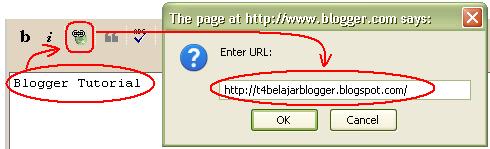
4. The output from above step, likes below

In This step, we have created a link. But it still a link with not open new tab type. To make it as Link with open new tab type, we just need for add some additional code, that is like below:

target="_blank"


And the last, the code will like below:

Real Mode:

<a href="http://t4belajarblogger.blogspot.com/" target="_blank">Blogger Tutorial</a>


FINISH!!!

Oh ya, i call this trick with name "simple trick" because: To generate this type we just need for Link generator Tool (was available in posting wall), and adding target="_blank" (you can type it manually with your keyboard) as an open new tab data. Then, you can use this trick every time for example: when you post the link out content from your blog, Etc. Feel you sure can do it - Blogging is easy!

Hopefully helpful_

Tags: generate a link open new tab, open new tab link creator, simple trick open new tab, new tab link blogspot, my blogger link in new tab

Install Printing Button in Our Blog

hi dear brothr n sistr, in this post we will discuss how to install printing button in our blog? To install printing button is very2 easy n simple, oh i hv forgtten some thing. What about? yah of course about printing button preview


to make as above (printing button), we just need following code


<div style="text-align: center;"><form>
<input value="Print this Article" onclick="print()" type="button"/>
</form></div>


yuhuuuu....finish, n the last dont forget to share about blogger tutorial with your friends ok.....


GoOd LuuCk

Tags: Install print button for Blogger, print Button HTML code, Free print button script

How to Install the Search Box on the Blog

What the function of Search Box? With search box the blog visitors can find the posts easily, without looking for all of our post one by one and this will make them feel more easily to find our other posts just with typing a keyword and press enter button on their keyboard.

To make the box, We just need the code below:

<form action="http://ur blog/web address.com/search"method="get"><input class="textinput" name="q" size="50" type="text"/><input value="Search" class="buttonsubmit"name="submit" type="submit"/></form>


Preview:


>>You can to customize it too by changing:

Blue: Your blog/web URL Address.
Red: Size of search Box
Black: The name of button, ex: Search, find, etc.


How easy?


gOoD LUcK []

Tags: install the search box, search box into blogger blog, search box HTML for Blogger

How to Create The HyperLink

What the function of hyper link? With Hyper Link we can put some URL address inside some text, so we can shorten some text with this trick. Forexample: we want to write "Please visit http://t4belajarblogger.blogspot.com" then to create it into short form, we can write "Please Visit t4belajarblogger", this form is bettr than before.

N to make it, we just need the codes below:

1. Hyper Link in same tab

With this kind, we can make a hyper link text when we click it will opened in the same tab, the code is:

<a href="http://t4belajarblogger.blogspot.com">t4belajarblogger</a>


ex: t4belajarblogger


2. Hyper Link in Different/New Tab


This kind will opened in different tab, the code is:

<a href="http://t4belajarblogger.blogspot.com" target="_blank">t4belajarblogger</a>


Ex: t4belajarblogger


3. Hyper Link with Image in same Tab

This kind such as the no.1, but this kind with image preview. The code is:

<a href="http://t4belajarblogger.blogspot.com/"><img src="http://software2iqbal.wordpress.com/files/2009/11/halaman_depan_t4belajarblog.jpg" alt="Home Page" /></a>


Preview

Home Page


4. Hyper Link with Image in Different/New Tab

The code is:

<a target="_blank" href="http://t4belajarblogger.blogspot.com/"><img alt="t4belajarblogger.blogspot.com" src="http://software2iqbal.wordpress.com/files/2009/11/halaman_depan_t4belajarblog.jpg" border="0" /></a>


Preview

t4belajarblogger.blogspot.com


To create hyper link is very easy n smple^


Hopefully Useful []

Tags: How to create the hyperlink, hyperlink tricks, simple html to create hyperlink, html text hyperlink, html image hyperlink, create hyperlink easily